INVENTORY AUTOMATION
Stock that manages itself, with a record of every decision.
Merchmix reads stock on hand across the DC and every store each day, moves what needs moving overnight, flags what needs a person, and logs all of it. Nobody runs a report to find out.
WHERE THIS SITS
From the budget to the shelf, one connected chain.
Inventory management is not the start of the process, it is what happens after every earlier decision has been made. Each stage hands its numbers to the next, so the stock the engine moves each night traces all the way back to the budget.
Inventory management
Stock read, risk scored, replenishment run and transfers logged, every night.
Every stage above writes to the same numbers. Change the budget and it reaches the replenishment run.
STOCK POSITION
One snapshot of every unit, DC and store, by SKU and size.
Every morning the snapshot shows total on hand, DC on hand and store on hand, with each SKU tagged healthy, below minimum, over maximum, negative or out at the DC. Filter by department, category or subcategory, switch between SKU and store view, and download the lot.
Health at a glance.
Five badges sort every SKU by its position against its minimum and maximum, so the below-minimum list is the morning's first read and the over-maximum list is the second.
Ageing in view.
Stock age buckets show what has been sitting and where, so slow movers are visible weeks before the markdown review would find them.
Discrepancies caught.
Negative units and DC-out positions are surfaced on their own tab, so the data problem is fixed before it becomes a replenishment problem.
By SKU or by store.
The same snapshot flips to a store view, so a regional manager sees their stores and a planner sees their range.
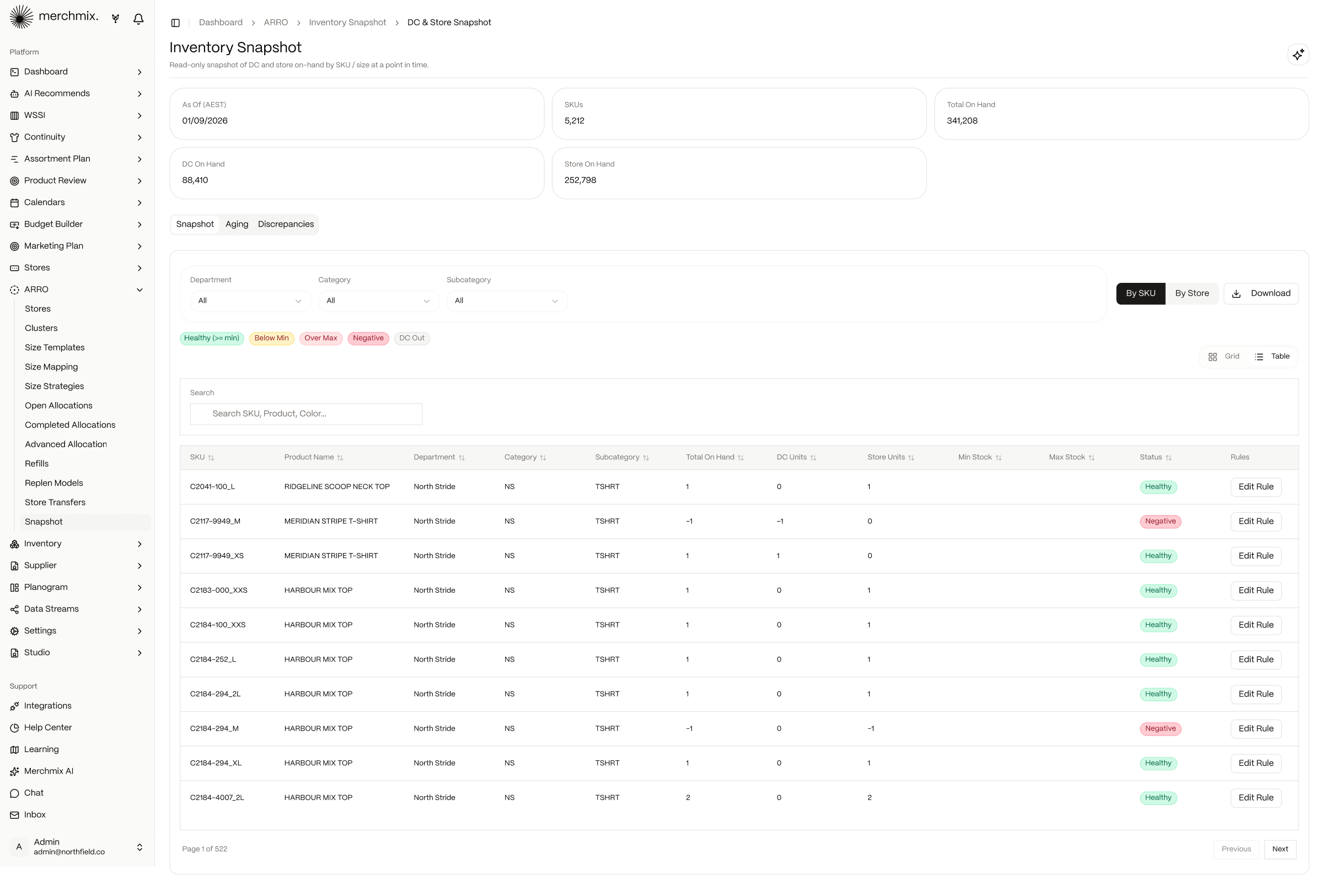
The snapshot is the same stock position the trade pack, WSSI and the allocation engine read, so every team is looking at the same number.
See Product Review →RISK DETECTION
Shortage, excess and dead stock, ranked by the revenue at stake.
Merchmix Intelligence scans sales, stock and cover for every style and store and files each risk as shortage, excess or dead stock. Every card carries units still at risk, revenue at risk, revenue protected if the recommended move is taken, and how many risk lines have a stock-move option.
Three risk types.
Shortage, excess and dead stock each get their own queue with a count, so the team knows whether today is a chase day or a clearance day before opening a card.
Revenue, not units.
Each style shows the sales at risk over the next twelve weeks and the sales the recommended action protects, so priority is set on money.
How we worked this out.
Open any style and the reasoning is written in plain language: what the next twelve weeks need, what is owned, what is sitting where it will not sell, what a transfer recovers, and what is still lost after the move.
Filters that match the meeting.
Unresolved only, recoverable only, stock-confirmed only, so the Monday list is the list that needs a decision.
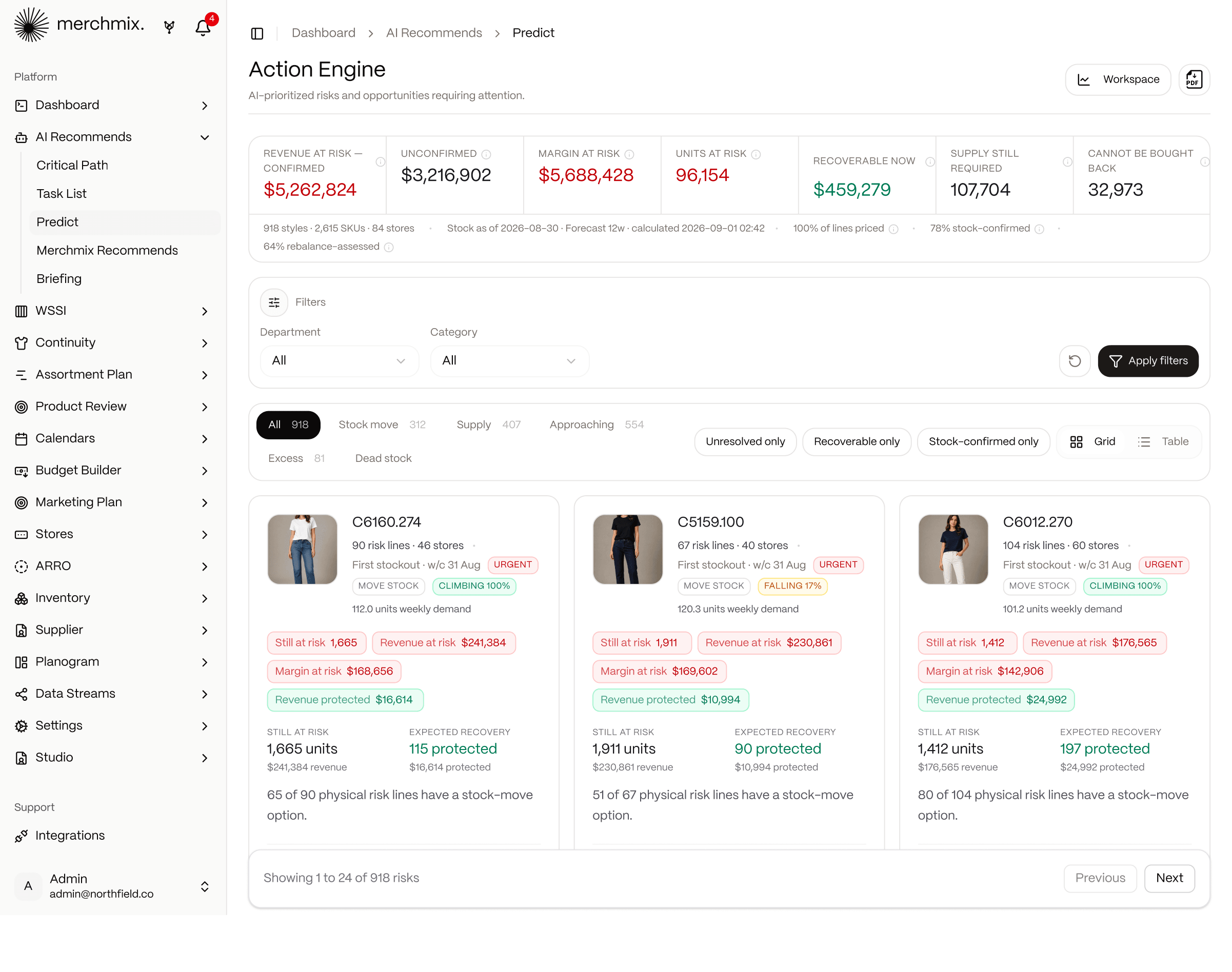
Recommended moves become tasks in Merchmix Recommends with an owner and a due date, so a risk flagged on Monday is not still open on Friday.
See Merchmix Recommends →REPLENISHMENT RULES
Set a rule once per style and it runs every night without a purchase order.
Bulk Refill lists every style sitting in the warehouse with its units on hand, sizes, distribution centres and current rule. Pick a model from the registry, set safety stock, minimum and maximum, add store overrides, and the rule applies from the next daily transfer. Styles that were sent to store without a rule are flagged at the top so nothing sits unmanaged.
Nine models, one registry.
Rate of sale, min-max, one-to-one, weeks of supply, safety stock buffer, demand curve, initial allocated quantity and more, each with its formula shown, so the team picks logic it can explain.
Scoped how the range is run.
Rules apply by style, category or department, so continuity basics and seasonal lines run different logic in the same run.
Guardrails on every rule.
Safety stock, minimum, maximum and store-level overrides sit on each style, so a rule cannot drain the DC or overfill a store.
Due tonight.
Each style shows what the next run will send, so the planner can check the number before the truck does.
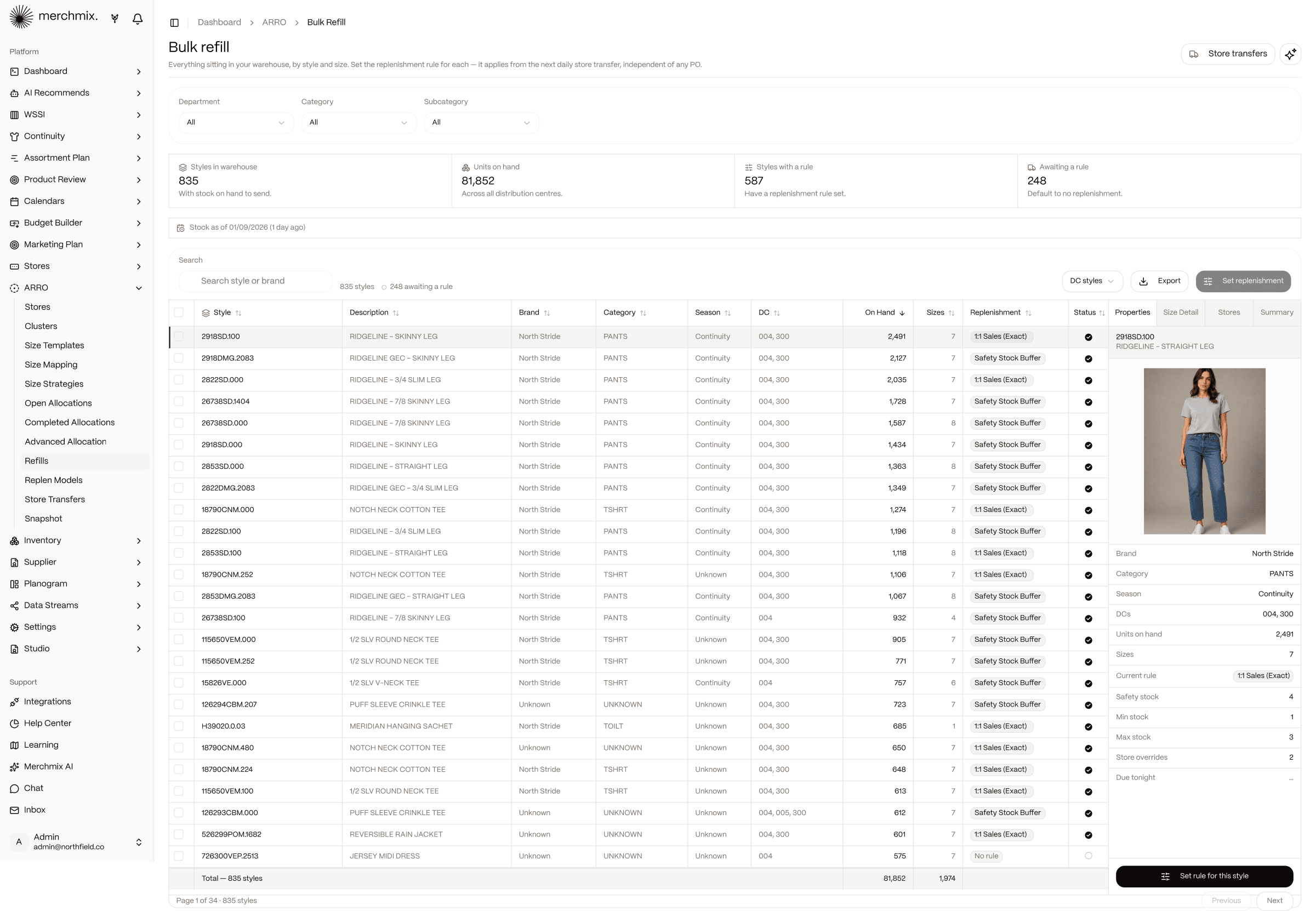
Rules read the same stock position as the snapshot and the same store grades as allocation, so replenishment and allocation never disagree about capacity.
See allocation and replenishment →EVERY RUN ON THE RECORD
Every overnight run logged, every transfer traceable to the ERP.
Store Transfers is the history of every run the engine has made: run ID, timestamp, manual or overnight, transfers created and units moved. Open a run and see it split into refills, warehouse transfers and allocations, then every line by store with the reference the ERP acknowledged.
Run ledger.
Every run is a card with its status, transfer count and units, so the question "what moved last night" has a one-screen answer.
Line-level trace.
Each transfer carries the store, SKU, size, units and the reference the ERP received, so a store query is answered from the run, not from the ERP.
Every movement type in one run.
Refills, warehouse transfers and allocations split out with counts on each, so a single run answers what was replenished, what moved between sites and what came off a purchase order.
Live send, with a switch.
Transfers post to the ERP automatically when live send is on, and the toggle records who changed it and when.
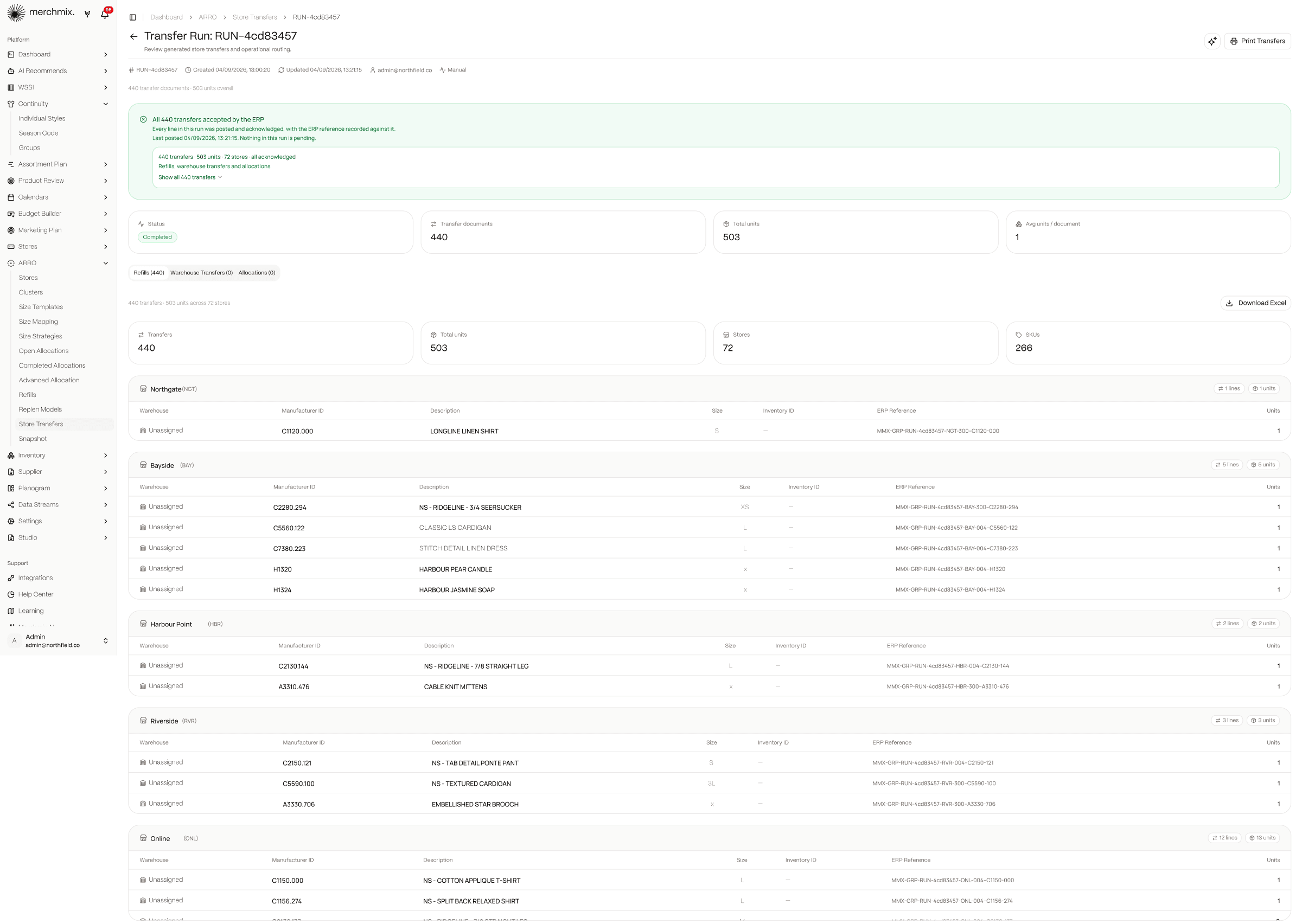
The ERP stays the system of record. Merchmix generates the transfer, the ERP books it, and the run keeps the reference between the two.
See Horizon ERP →YUKTI
Ask the loop what it did and why.
Yukti is the Merchmix agent. She reads the same stock position, forecast and run history the loop reads, so the question is asked in a sentence and answered with the numbers behind it: what moved last night, which stores are below minimum this morning, why a style was flagged, what tonight's run will send.
Answers over your own data.
Ask in plain language and get a table or a chart built from your trading history and live stock, not a canned report.
The morning briefing.
Before anyone logs in, the brief is written: what ran, what failed, what is at risk, what needs an approval.
Shows the working.
Every recommendation carries the evidence behind it, so the team can challenge the logic instead of rebuilding the work.
Waits for a person.
Rules, guardrails and the live-send switch stay with the planner. Nothing commits until someone approves it, and every change is logged against a name.
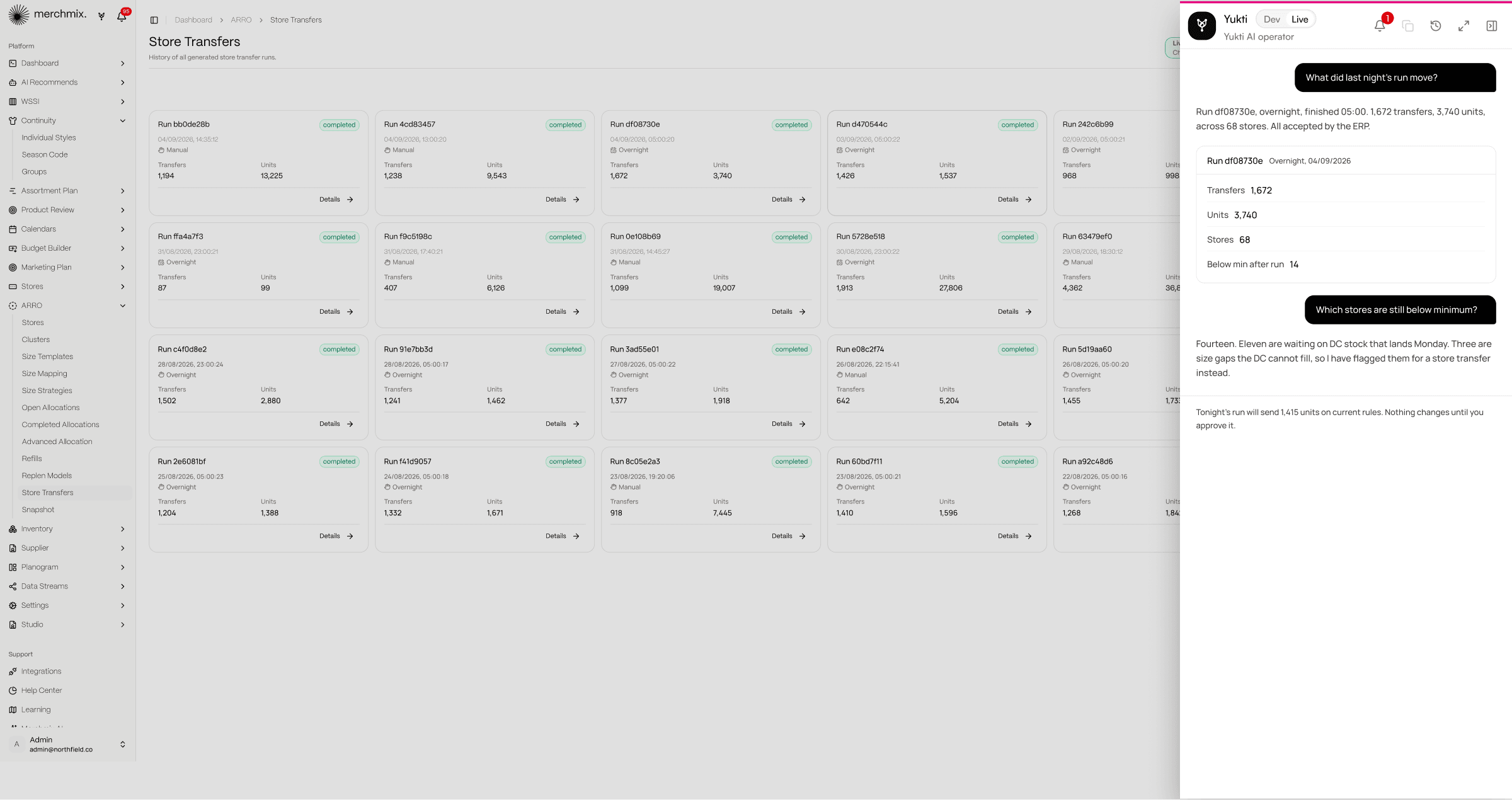
Yukti is one operator across the whole platform. What she answers here about stock she also answers about the budget, the range and the trade pack.
See Merchmix AI agents →See your own stock position, and what last night's run would have moved.
A six-week proof of concept on your own data. Bring your stock file and your store list, and see the snapshot, the risk queue and the first run.
Frequently asked questions about automated inventory management
Common questions about how Merchmix runs automated stock position monitoring, overnight replenishment and ERP transfer logging.