merchmix.

BEACON · SUPPLIER PORTAL

Suppliers in the system, not in your inbox.

Beacon is the supplier side of Merchmix. Suppliers accept orders, declare what is coming and invoice in one place, and every declared quantity flows into allocation, so stores are planned against what is actually arriving.

01 · PURCHASE ORDERS

Purchase Orders

Orders raised in Merchmix appear in Beacon as pending. The supplier opens the order, reviews the line items, the delivery location and the expected date, and accepts it with their own sales order reference and a confirmed ex-factory date. Merchmix is notified the moment they do. If they cannot meet the date or the quantity, they raise it first and the order is amended before it is accepted, not after.

Accept with a date.

Acceptance requires a vendor reference and a confirmed ex-factory date. Past dates cannot be chosen.

Status locked after acceptance.

Once accepted, an order cannot be cancelled from the portal. Changes go back through Merchmix.

Order history.

Completed and cancelled orders move to an archive with the reason recorded against each one.

Search, print and export.

Filter by status, print a PO, export the list to CSV.
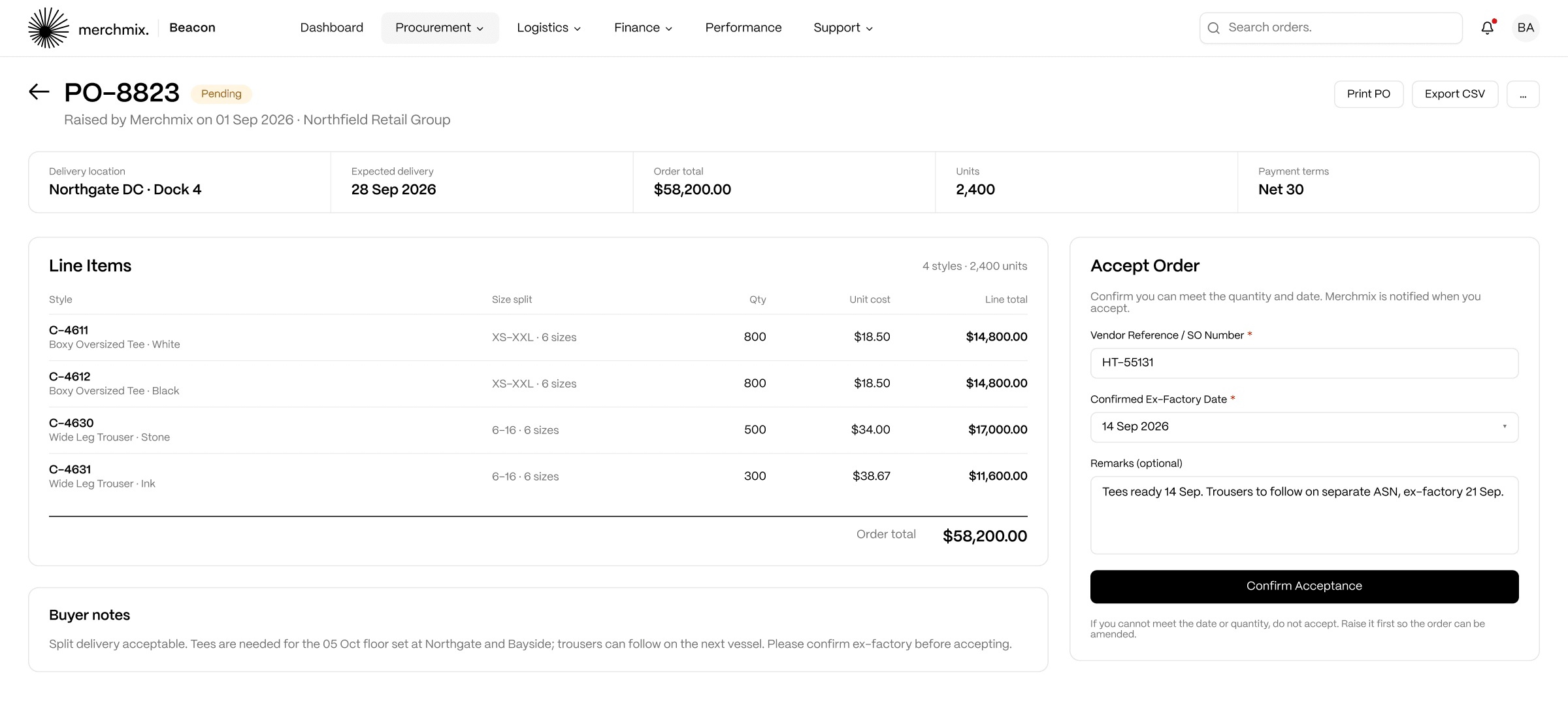
Beacon purchase order detail with the Accept Order panel
HOW IT CONNECTS

POs are raised in Horizon ERP and Core, and the accepted date flows straight back into inbound planning.
02 · ADVANCE SHIPPING NOTICES

ASN Management

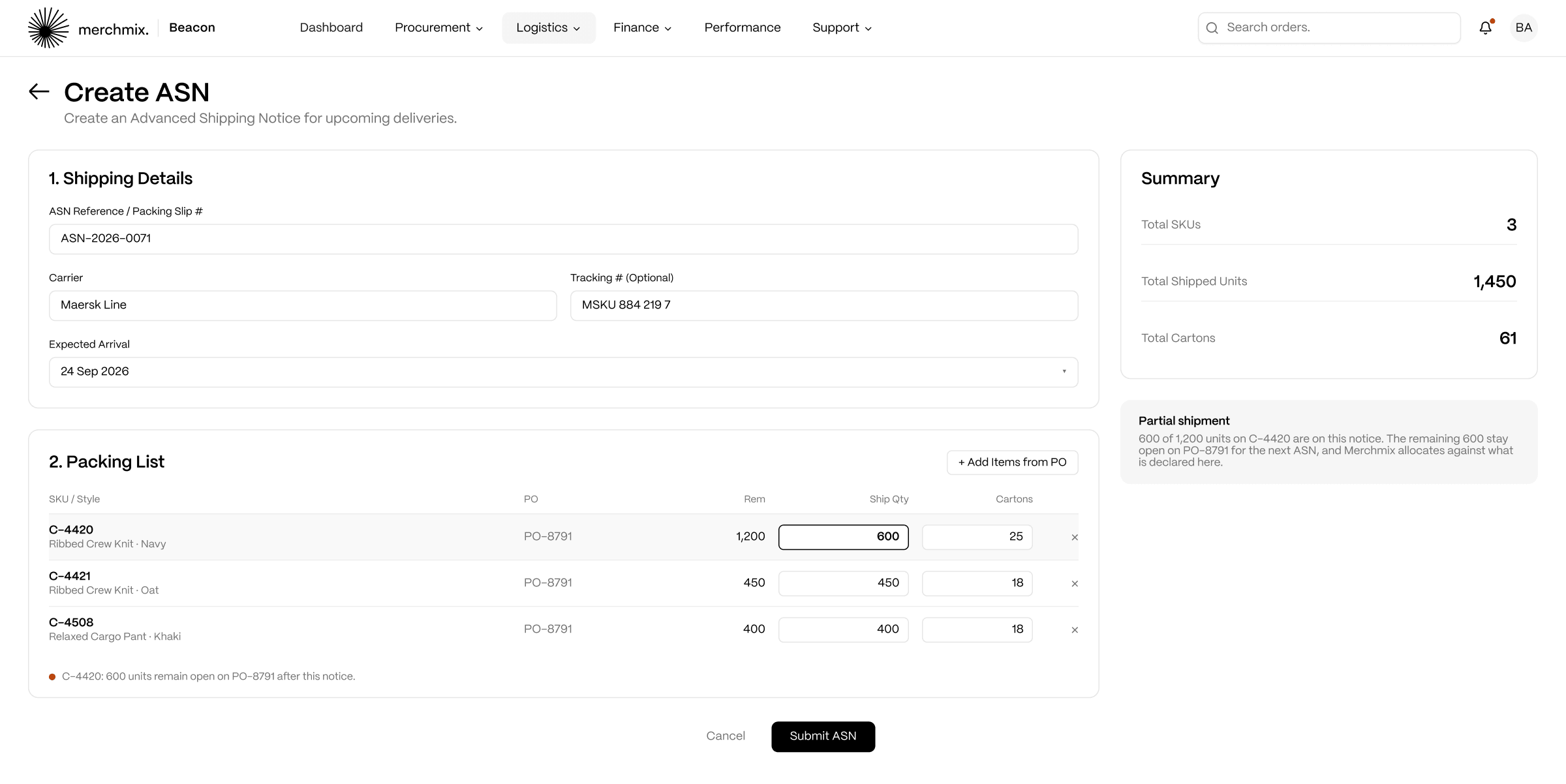
Before goods leave the supplier, they raise an advance shipping notice against the PO lines they are sending. Beacon shows the remaining quantity on every line, caps the quantity to what is still open, and requires a carton count for every line. There is no draft. Submitting creates the notice and sends it, so the receiving warehouse knows what is coming and when before the truck leaves.

Partial shipments declared, not discovered.

Remaining quantity is shown on every PO line. A supplier sending half the order declares half, and the balance stays open for the next notice.

Cartons and quantities enforced.

Ship quantity cannot exceed what is open on the order. Every line needs at least one carton.

Built from the PO.

Items are added from the order, searchable by SKU or PO number.

Carrier, tracking, arrival.

Reference, carrier and expected arrival date are required. Tracking number is optional.

Beacon Create ASN screen showing a partial shipment: 600 of 1,200 units declared on a purchase order line
HOW IT CONNECTS

The quantities on a submitted notice, not the quantities on the original order, are what ARRO allocates against. A short shipment is planned for the moment it is declared, so stores are not allocated stock that is not coming.

03 · BOOKINGS & SHIPMENTS

Freight Bookings and Shipments

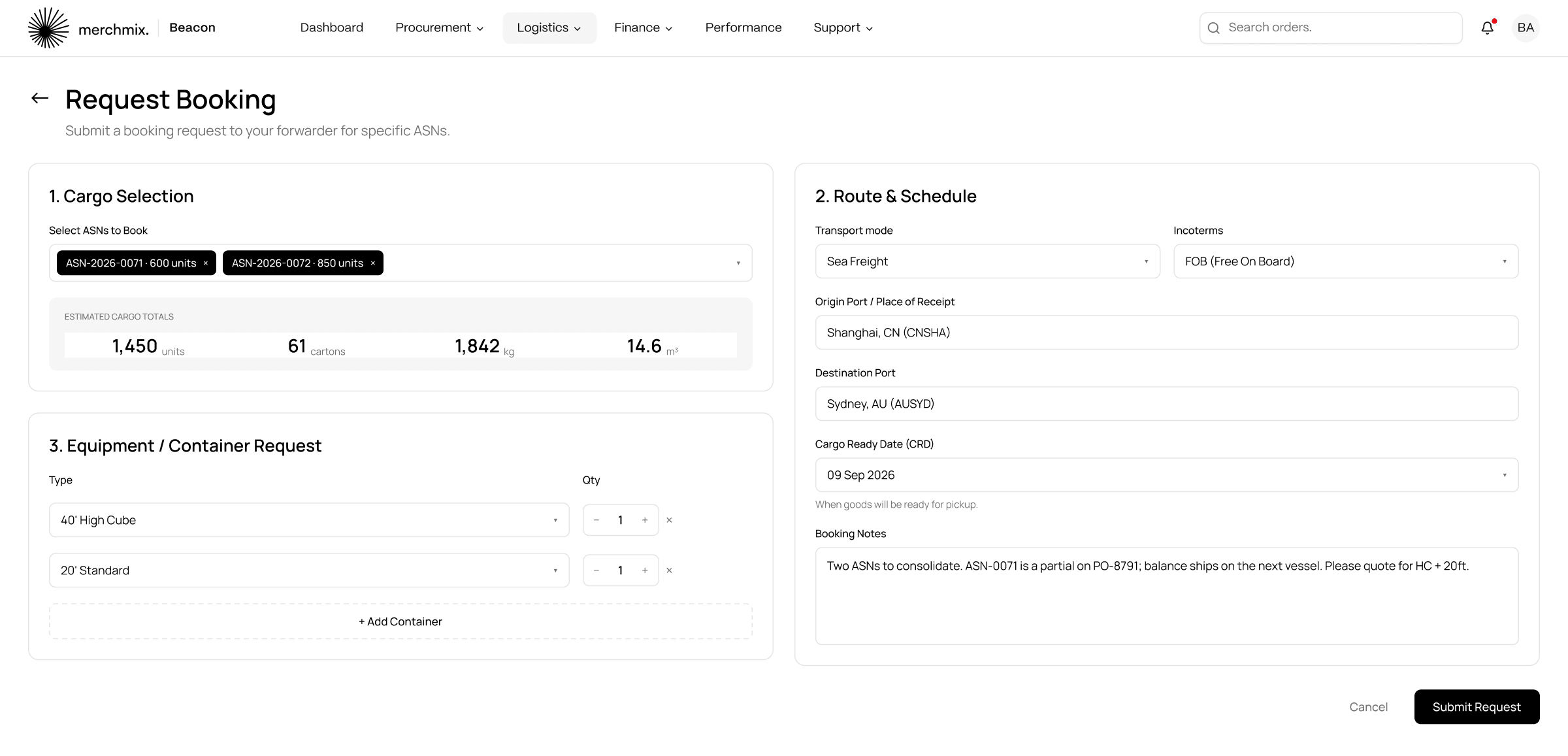
Freight is booked against submitted shipping notices, so a booking cannot exist for goods that have not been declared. The supplier selects the notices, sets the transport mode and Incoterms, enters origin and destination ports and the cargo ready date, and adds the containers needed. The forwarder confirms, the sales order becomes downloadable, and a shipment is then created against the booking with carrier, tracking, ETD and ETA.

Sea, air or rail.

Transport mode and Incoterms (FOB, CIF, EXW, DDP) set on every booking.

Container request.

Type and quantity per row, with estimated cargo totals across the selected notices.

Requested to confirmed.

Booking status moves when the forwarder confirms. Ports and cargo ready date stay editable; the rest is fixed.

Shipment tracking.

Weight, volume, ETD and ETA required. Active, in transit, exceptions and 30-day on-time rate across the top.

Beacon freight booking request with two ASNs, route and container rows
HOW IT CONNECTS

Shipment ETAs are what allocation and replenishment read when they decide what can be promised to stores.

04 · LABELS & PACKING

Labels & Packing

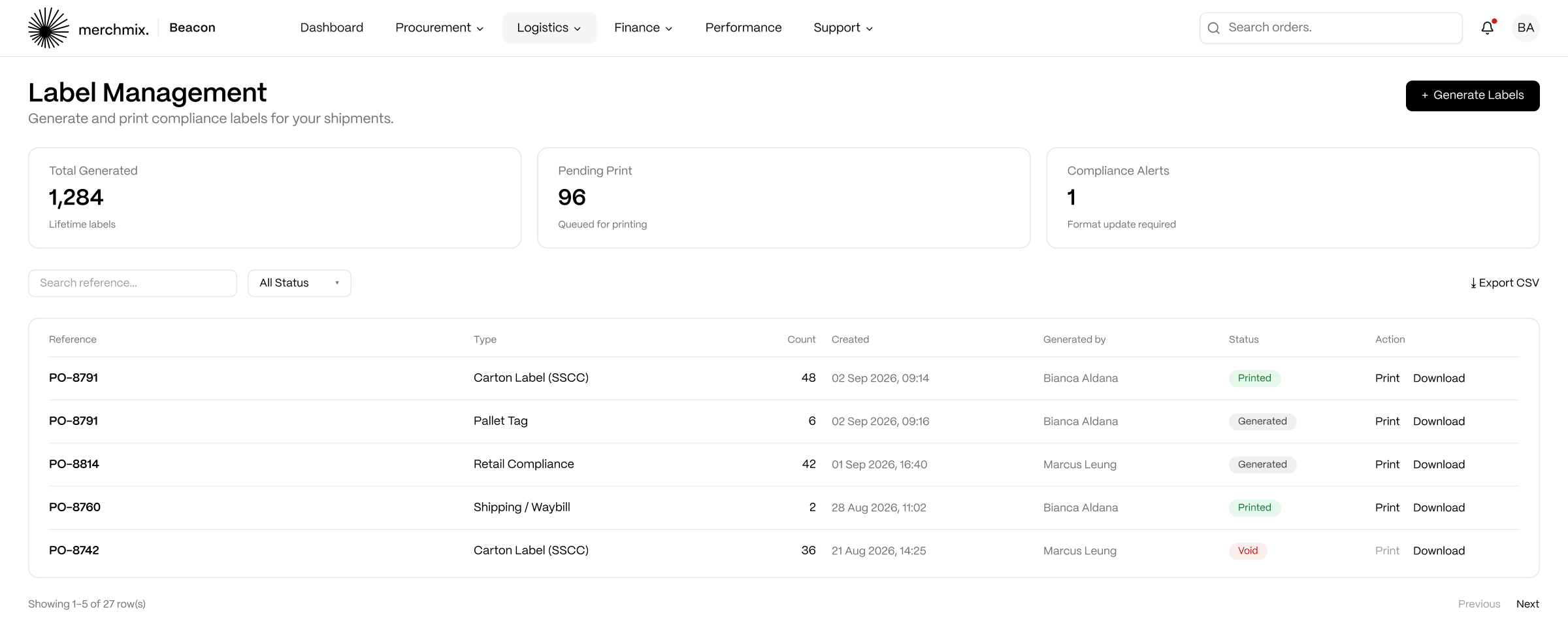
Compliance labels are generated in the portal against a reference, usually the PO number, in the type and quantity the receiving site needs. Print opens the PDF; download saves it. Status is tracked as generated, printed or void, so a batch raised in error is voided rather than corrected.

Four label types.

Carton (SSCC), shipping waybill, pallet tag and retail compliance.

Batch by reference.

Reference, type and quantity per batch, searchable by any of them.

Status you control.

Generated, printed or void. Editing closes once a label is printed or void.

Compliance alerts.

Format updates required are flagged on the page.

Beacon label management list across carton, pallet, waybill and compliance labels
HOW IT CONNECTS

Labels match the carton and pallet structure declared on the shipping notice, so receiving scans what the ASN said would arrive.

05 · INVOICES & REMITTANCE

Invoices and Remittance

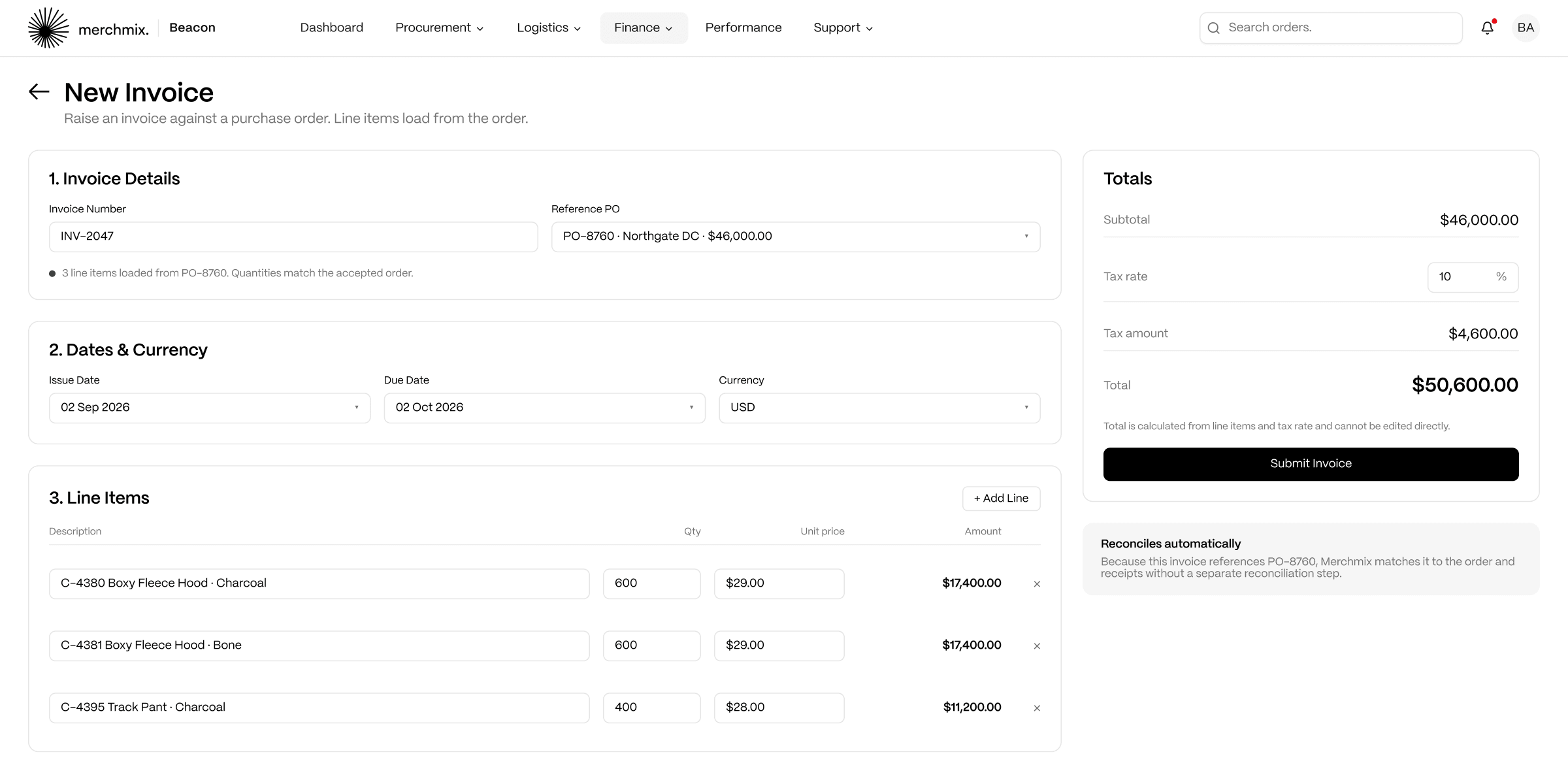
Invoices are raised against a purchase order. Selecting the order loads its line items into the invoice, totals calculate from the lines and the tax rate, and the total cannot be typed by hand. An invoice raised this way reconciles automatically in Merchmix. Once payment is made, remittance advice records it against the invoices it settles, so the supplier can find a payment from an invoice number or an invoice from a payment.

PO-referenced by default.

Lines load from the order. Standalone invoices are the exception, not the route.

Six statuses.

Draft, pending, approved, paid, overdue, cancelled. Editing closes once an invoice is approved, paid or overdue.

Remittance matched to invoices.

Wire, ACH or cheque, with the paid invoices selected from approved and pending.

Snapshot on the dashboard.

Total invoiced, paid and outstanding, with payment terms shown on the remittance page.

Beacon new invoice with line items loaded from the purchase order and calculated totals
HOW IT CONNECTS

Approved invoices and recorded remittance write to the ledger in Horizon ERP, so finance sees the supplier position without a reconciliation exercise.

06 · DEMAND FORECASTS

Demand Forecasts

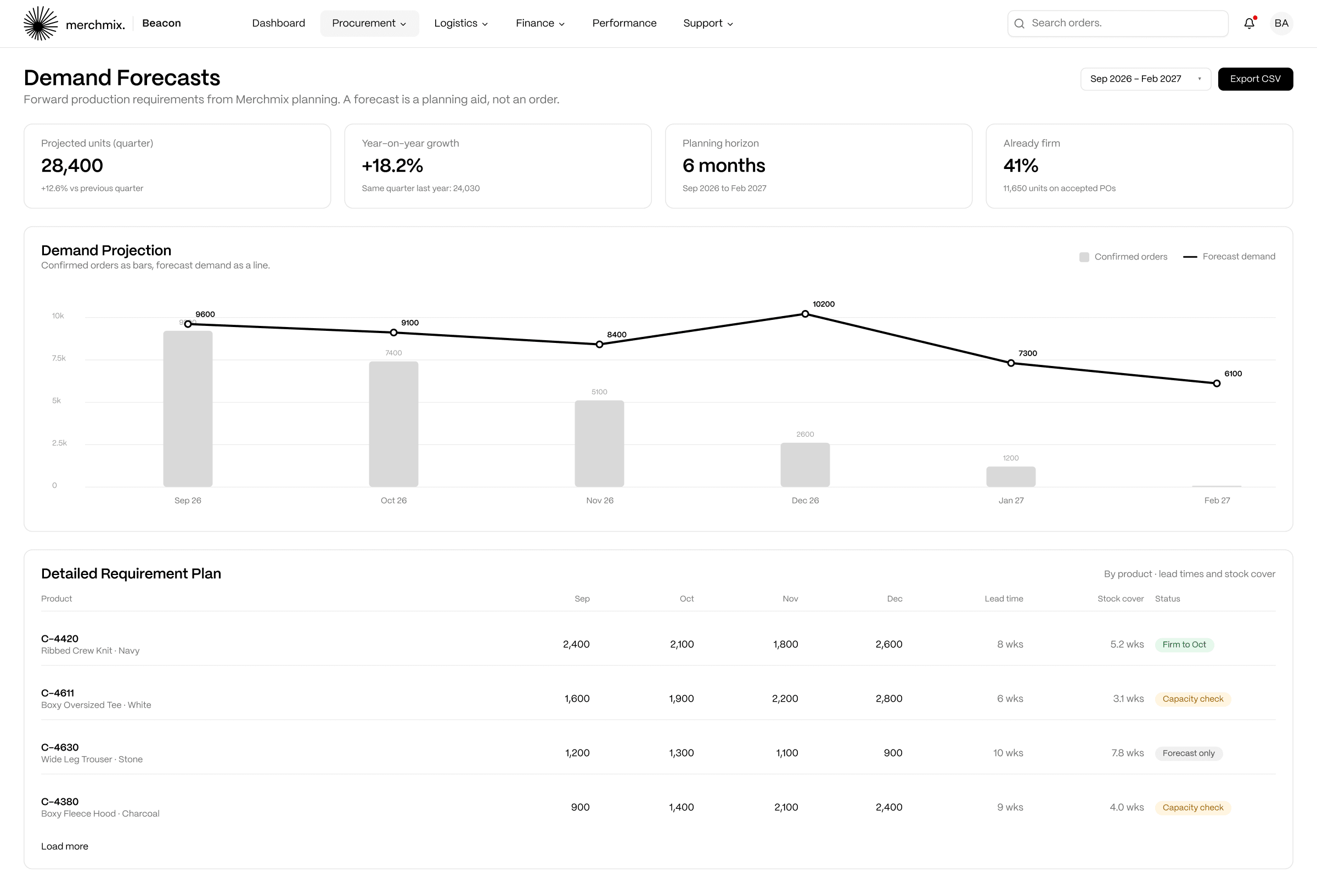
Suppliers see forward demand before it becomes a firm order, so capacity is planned against what is coming rather than what has arrived. Projected units for the quarter, change on the previous quarter, year-on-year growth and the planning horizon sit at the top. The demand projection chart shows confirmed orders as bars with forecast demand as a line over them, so the supplier can see how much of the projection is already firm. A forecast is a planning aid, not a commitment. Only a purchase order is an order.

Confirmed against forecast.

Bars for firm orders, line for projected demand.

Requirement plan by product.

Lead times and stock coverage per line, exportable to CSV.

Quarter and year-on-year.

Movement shown against the previous quarter and the same quarter last year.

Planning horizon.

Months in view controlled by the date range picker.

Beacon demand forecast chart with confirmed orders and forecast demand
HOW IT CONNECTS

Forecast demand comes from Core planning, so the supplier is working from the same numbers as the buyer.

07 · ACCESS & NOTIFICATIONS

Access and Notifications

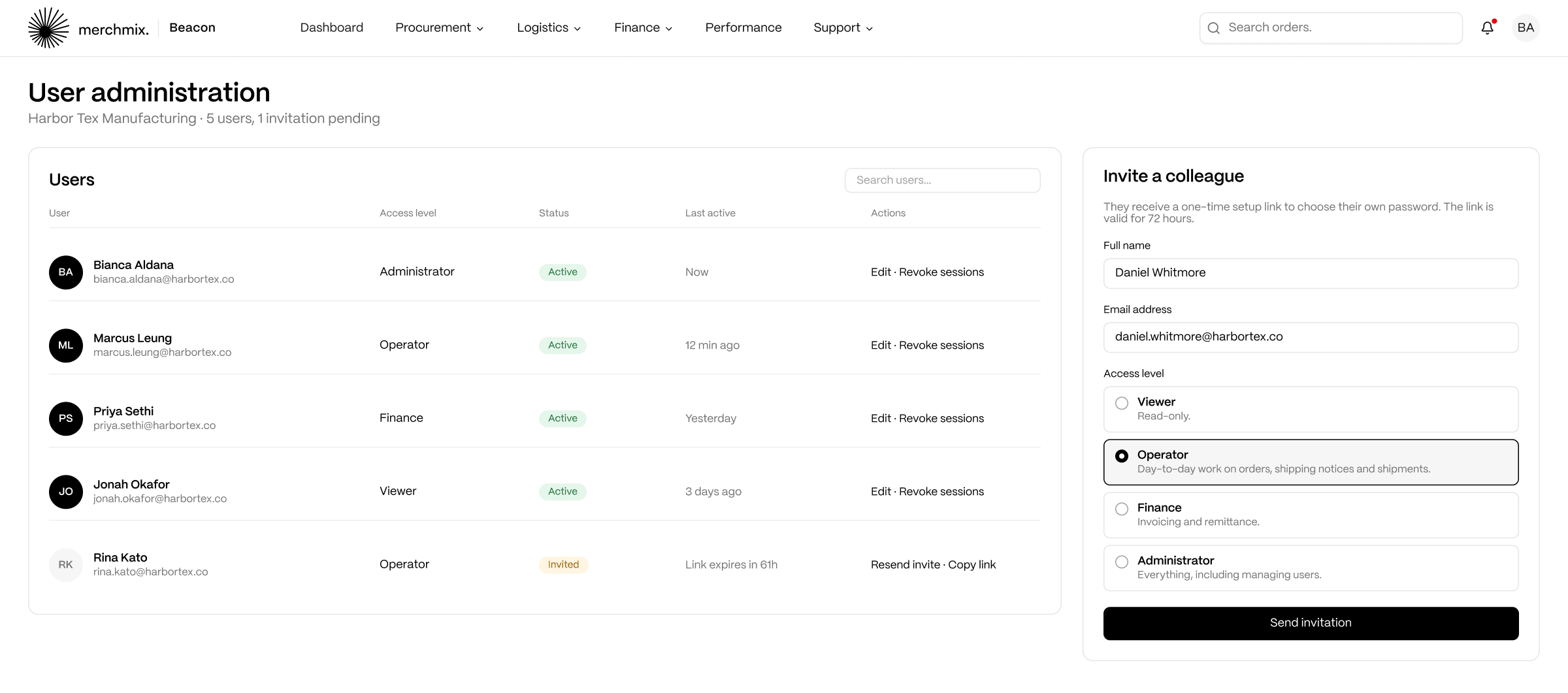
Each supplier administers its own users. Four access levels cover the roles that actually exist on a supplier's side: Viewer for read-only, Operator for orders, shipping notices and shipments, Finance for invoicing and remittance, Administrator for everything including users. Invitations carry a 72-hour setup link. Notifications cover orders, shipments, finance and alerts, link straight to the record, and are mirrored by email according to each user's preferences.

Four roles.

Viewer, Operator, Finance, Administrator.

Invite and revoke.

Add users, resend invitations, revoke sessions from user administration.

Notification centre.

All and unread, mark all read, links through to the record.

Help and learning built in.

Guides for every workflow and short walkthroughs of everyday tasks inside the portal.

Beacon user administration with four access levels and an invitation panel
HOW IT CONNECTS

Supplier users are separate from Merchmix users. The retailer team never has to manage a supplier's logins.

HOW BEACON FITS

One sequence, both sides of it.

Beacon does not run alongside Merchmix. It is the supplier's window into it. Purchase orders come out of Horizon ERP and Core. Accepted dates, declared quantities and shipment ETAs go back into the inbound picture ARRO allocates against, so a partial delivery changes the allocation before it changes the receipt. Invoices and remittance write to the ledger. Supplier performance is measured on the retailer side in Supplier Management, from the same records. Nothing is re-keyed and nothing is chased.

Core & Horizon ERP

Purchase orders are raised in Core and Horizon ERP with strategy and terms attached, and land in Beacon.

Core Plus & ARRO

Accepted dates, declared quantities and shipment ETAs feed what ARRO can promise to stores.

Horizon ERP ledger

Approved invoices and remittance write to the ledger without manual reconciliation.

Supplier Management

The retailer reads on-time delivery, quality and lead time variance from the same records.

We were overloading containers with low velocity bulky stock. Adjusting that saved hundreds of thousands in freight.

Michelle Taylor

Head of Valla Living

Michelle Taylor, Head of Valla Living, on optimizing container loading and freight bookings with Merchmix

Frequently asked questions about Beacon

See Beacon on your own orders.

A six-week proof of concept on your own data, with your suppliers accepting real purchase orders.